
Google Play screenshot generator
Upload your Android captures, pick a layout, and write your captions once. Appure frames every device, translates the captions, and exports screenshots the Play Console accepts on the first upload.
Free for one app · No credit card · First export in about 5 minutes
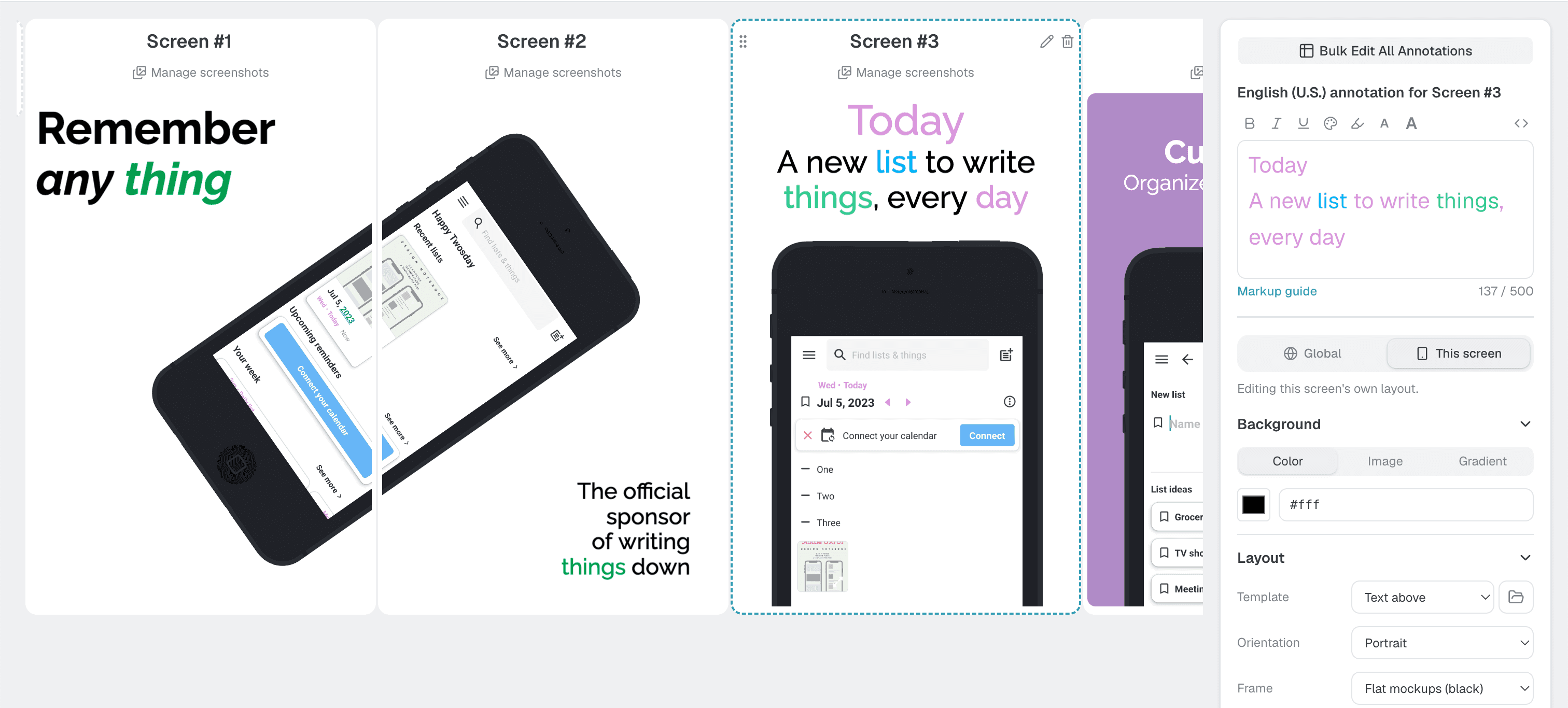
How it works
- 1
Upload your screens
Drop in raw captures from the simulator, emulator or a real device.
- 2
Pick a layout and write captions
Choose a template, add a caption per screenshot, and translate them all at once.
- 3
Export the whole set
Download every required size for every language, ready to upload.
Exported to Play Console rules
Google Play accepts a range rather than fixed device sizes: JPEG or 24-bit PNG, each side 320 to 3,840 px, the long side at most twice the short one. Raw captures from modern tall phones break that rule; framed exports don't.
| Asset | Size (px) | Notes |
|---|---|---|
| Phone | 1080 × 1920 · 1440 × 2560 | 9:16, 2 to 8 screenshots, up to 8 MB each |
| 7″ tablet | 1200 × 1920 | Recommended size. Optional, shown on tablet listings |
| 10″ tablet | 1600 × 2560 | Recommended size. Optional, shown on tablet listings |
| Feature graphic | 1024 × 500 | Required. Make it with the free generator below |
Every dimension for both stores is on the screenshot sizes reference.
What you get
20+ device frames
Frame your app on the devices your users actually hold, in 4 finishes: Gray, Silver, Clay Gray, Clay Black.
26+ languages in one click
Write a caption once and Appure translates it into every language the store supports. No translators, no copy-paste.
30+ layouts
Captions above, devices angled, or a panorama across two screenshots. Start from a proven arrangement, then make it yours.
Portrait and landscape
Both orientations for every device. Toggle one option and export.
Your fonts and colors
16+ built-in fonts or upload your own, plus solid, gradient or image backgrounds, shadows and annotations.
Per device and language
Different captures per market? Upload any combination of device and language and Appure keeps them matched.
What makes Google Play screenshots convert
The editor handles the sizes. These are the decisions that are still yours.
Lead with the benefit
Your first screenshots carry the most weight, because many people never scroll the gallery. Show the main thing your app does for them, not the login screen.
Frame tall captures
A raw 20:9 capture fails the Play Console's 2:1 limit. A device frame on a 9:16 canvas fixes the ratio and gives you room for a caption.
Localize per market
Play Console lets you upload screenshots per language. Translated captions read better than an English set shown everywhere.
More in the guide: How to make Google Play screenshots →
Pricing
Free for one app. Plus is $9/month for every feature and every language, for up to 10 iOS or Android apps. Compare plans.
Free tools for the rest of your listing
Google Play screenshot generator FAQ
What size should Google Play screenshots be?+
Each side must be between 320 and 3,840 px and the longer side no more than twice the shorter (16:9 or 9:16), as JPEG or 24-bit PNG up to 8 MB. A 1080 × 1920 or 1440 × 2560 px portrait set works for phones. Appure exports to these rules automatically.
How many screenshots does Google Play need?+
At least 2 and up to 8 per device type (phone, 7-inch tablet, 10-inch tablet). Most apps upload 4 to 8 phone screenshots with the strongest message first.
Why does the Play Console reject my screenshot?+
Usually the aspect ratio: modern phones capture at around 20:9, which breaks the 2:1 limit. Transparency in a PNG or a side over 3,840 px also fail. Framing the capture on a 9:16 canvas solves the ratio.
Does it make the feature graphic too?+
The 1024 × 500 feature graphic has its own free tool: the Google Play feature graphic generator, linked above. Appure handles the screenshots.
Is the Google Play screenshot generator free?+
It is free for one app, with no credit card. Plus is $9/month for every feature and language across up to 10 apps.